

Organized producers do not own more tools than anyone else. They have one answer for each job: where the music is made, how it is checked, where notes go and where files live.
What DAW should I use?
The best DAW is the one you can use without thinking. Everything starts in the digital audio workstation. Ableton Live, Logic Pro, Cubase and FL Studio are four that producers use, and so are Reaper, Studio One and Pro Tools. I started on Logic, moved to Cubase and now work in Ableton. Each move came down to workflow: I felt I was not getting what I wanted out of the DAW I was using.
Organized producers spend their effort on how they use the DAW: a template for new sessions, clear track names and colors, and a fixed place for the project folder.
Plugins, named by job
Name your plugins by what they do: an equalizer, a compressor, a limiter, a reverb. Keep a short list of go-tos for each job. A short list is faster than a long one, and you learn what each tool does to the sound.
For me this almost always comes down to taste. I have purchased hundreds of plugins, and I lean on the same five every single time. I like the sound they produce, I understand how to get a specific sound from them and I feel comfortable using them.
A loudness meter
A loudness meter shows the integrated LUFS and the true peak of a mix, and those two numbers say how a streaming service will treat the track. What is LUFS? Spotify’s loudness target and true peak covers them. Outro shows Peak and LUFS for a project’s main bounce in the top bar.
What is a reference track?
A reference track is a finished song you compare your mix with at matched level. Without matching the level, the louder one wins every comparison. Keep references with the project so they are there when you open it again.
In Outro, a project’s Overview has a Reference tracks section. Keep links and named tracks, or add a WAV, MP3, M4A or FLAC file and play it in place. Outro copies the file, up to 512 MB, into a References folder in your project folder, and you can open it in A/B Compare from the same row.
Monitoring
Monitors, headphones and the room you listen in decide what you hear. This comes down to knowing your room and your gear. Price and brand do not matter as much as you think. I had a friend who mixed huge records with millions of streams on Skullcandy earbuds, because he knew how those earbuds sounded across every mix.
Samples and stems
Samples and stems pile up fast. The habits that matter are small: keep the samples a project uses with that project, name stems by part, and put them in a folder called Stems.
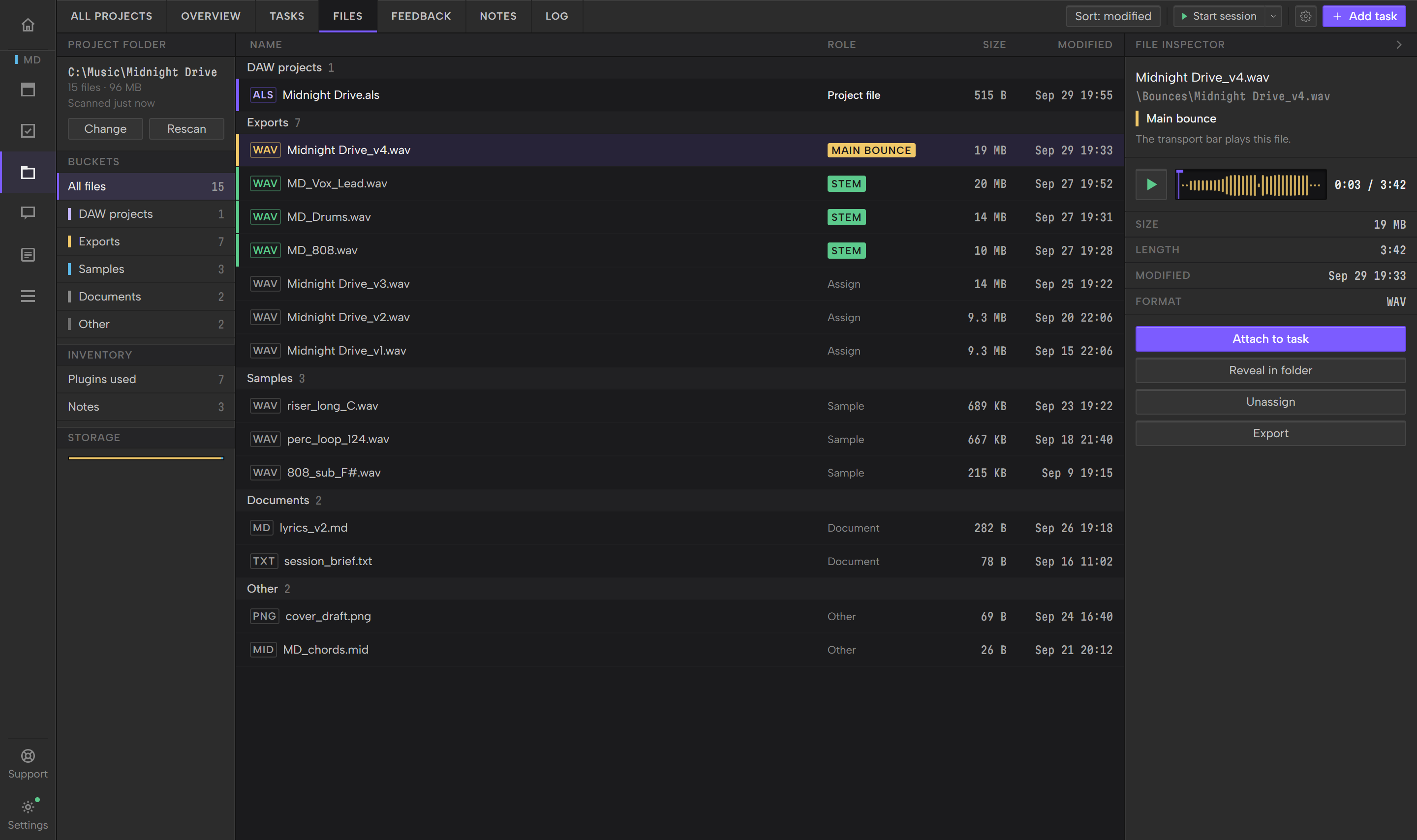
In Outro, Files sorts a linked project folder into buckets: DAW projects, Bounces, Stems, Samples, MIDI and documents. Audio in a folder named stems, trackout or multitrack lands in the Stems bucket.
Names and versions
Bounces pile up. Name each one with the project, a version number and the date, and keep one marked as the real one. In Outro that is the main bounce: the Play button plays it, and the Bounces list on the Overview shows each track uploaded on Feedback, newest first, with the main bounce marked.
Backups
Back up the whole project folder, not only the session file, because a session without its audio and samples will not open the way you left it. Keep a second copy somewhere other than that drive. Every three to six months I back everything up to cloud storage. My main drive has everything on it, and all my samples, sounds and projects are in the cloud too.
A task list and notes
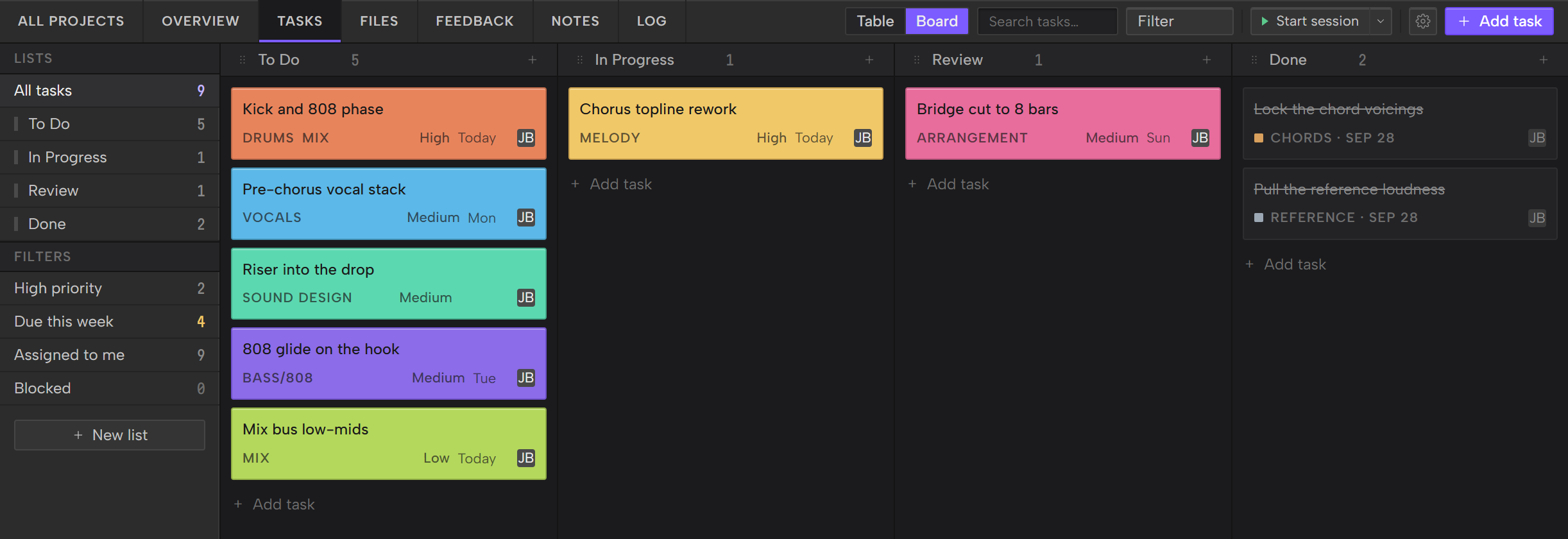
Every track has a list of what is left: re-record the hook vocal, fix the second drop, print stems. Write it down somewhere that is not your head. Plain text works. A list per project works better, because each task can carry a status and a part of the track.
In Outro, Tasks keeps a list for each project as a table or a board. You tag each task by the part of the track it touches, such as melody, drums or mix, and give it a status and a due date. Notes sit beside it: lyrics, mix notes and references, tagged by part and pinned if they matter.
A session log
Timing sessions shows where the hours go. In Outro, the Log has a timer and a manual entry, tags each session by what you worked on and totals the hours for a project: total time, last session, average and longest.
Feedback on a bounce
Feedback arrives in whatever channel the listener likes: a text, a voice note, a comment under a link. What helps is one place for notes, tied to a version. How to write mix notes a mixer can act on covers the writing. In Outro, you upload a bounce and copy its Share Link, and comments land on the track in the order they occur.
Where Outro fits
Outro is not a DAW, a plugin or a mixer. It is the layer that holds the rest of this list for each track: tasks, files, notes, the session log and feedback, next to any DAW on Windows and Mac. It reads BPM and key from your session when it can, for the DAWs listed in the Your DAW Guide. Outro is in beta. The Getting started Guide covers installing it and linking a project folder. For the overview of what Outro does for a producer, see project management for music producers.