
“The vocal feels off” is a mix note. It is also a note the mixer cannot act on. Both the person giving notes and the person receiving them lose time when a note is vague.
Why vague notes cost a revision
A mix holds hundreds of decisions. A vague note leaves the mixer to guess which one you mean, so the first revision tends to be a guess and the second one the real change. A precise note turns the same feedback into a single edit. A note carries three pieces of information: which part, where and what to do. Most vague notes drop two of them.
What should a mix note include?
Write each note with three pieces: the part, the place and the change. The part is the instrument or element: the lead vocal, the kick, the pad. The place is where it happens, as a time in the track or a section name. The change is what you want different.
Compare two notes. “The vocal is too quiet in the second verse.” And: “Lead vocal at 1:42: the end of the line is lost under the guitars. Bring it up or move the guitars back.” The second note names the part, the time and the change, and the mixer can open the session and go straight to it.
A time beats a section name. “The chorus” can be four different places in a long arrangement, and the note is only as exact as the place it points to.
When I receive notes, this is what I want most: exact timestamps. The notes do not even have to be long. Just “this part right here is where I don’t like XYZ.”
Write while you listen, then rewrite
Take notes in one pass with the track playing, then rewrite them before you send. First reactions are often about how the mix feels. The rewrite is where you find the part and the place behind the feeling.
Say how much
A direction is easier to follow with a size. “A little more” and “a lot more” are different edits. If you can name a number in dB, name it. If you cannot, point to a reference: “as present as the vocal in the reference at 0:50”. If neither works, describe the effect you want: “I want to hear the breath before the line.”
Keep the good news in
Say what works. “Keep the intro exactly as it is” protects it from the next revision. A mixer who only hears problems has no way to know which parts are finished.
I have worked with clients who say this, especially when we go back and forth because we are unsure how a section should be mixed. I work up a few different versions, and that is usually where it lands in the end.
One note, one problem
Split a note that holds two requests. “Louder and brighter” is two changes, and they can pull against each other. Give each its own line, or number them, so the mixer can answer each one: done, or tried it and here is why not.
How do you respond to mix notes?
When you receive a note you do not understand, ask for the place and a reference before you change anything. When the note is clear and you disagree, try the change and listen. If it is better, keep it. If it is worse, say what you heard and what you did instead. A note reports what the listener heard. The fix is the mixer’s to choose. Answer against the same note, so the whole exchange stays in one place.
When I think a note is wrong, I usually give the technical details on why something is the way it is, or why it isn’t.
Tie the note to a version
Say which version you heard. “Mix v3” and “mix v5” are different tracks, and a note about v3 may already be fixed in v5. Put the file name or label in the note. A producer who bounces after every change ends up with a folder of files that all sound close, and the label is what tells them apart.
Put the note on the track
A note is easiest to act on when it sits on the audio. The Feedback tab in Outro does this. You upload a bounce and copy its Share Link. Whoever opens the link plays the track, clicks the waveform where the thing happens, picks a tag (Mix, Arrangement, Melody, Lyrics, Bass/808, Sound Design, Vocals or General) and writes the note. Comments are listed in track order, each with its time, its tag and who wrote it. In Outro, click a comment’s time and the track plays from there.
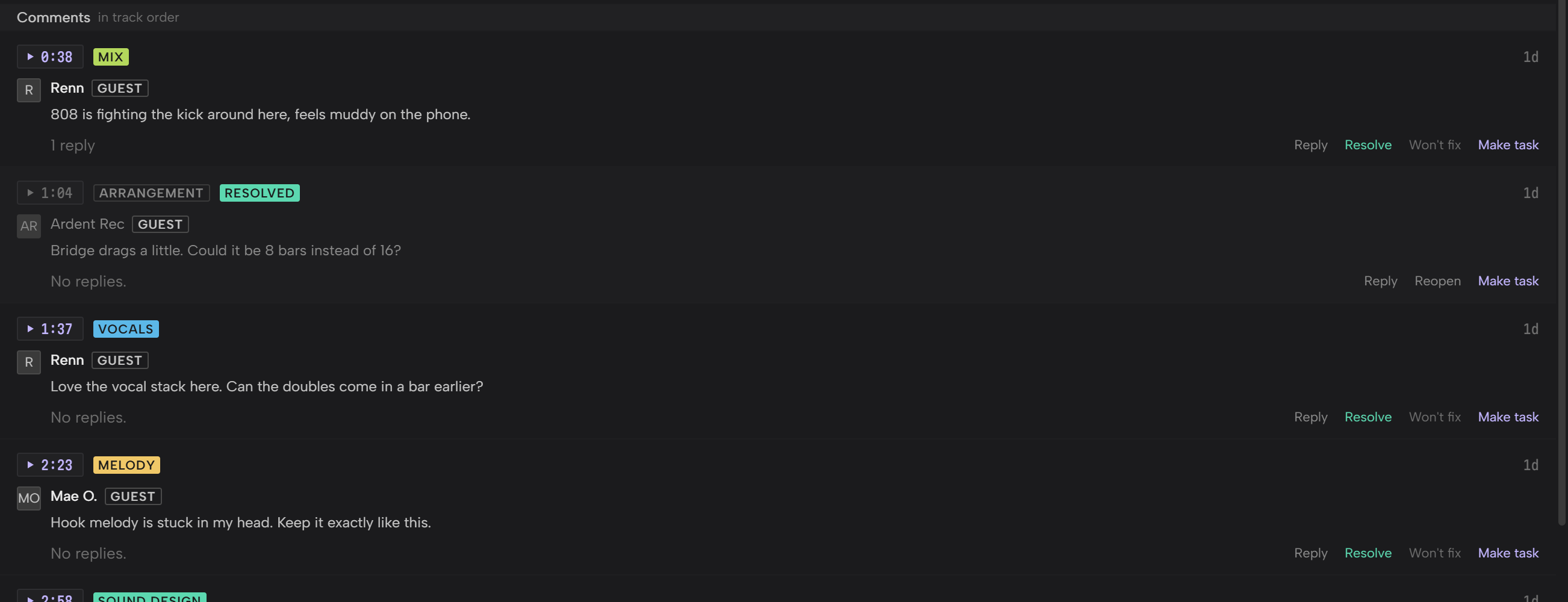
You can reply to a note, and your reply shows on the page the listener sees. Click Resolve when a note is handled, or Won’t fix when you are leaving it, and the Status buttons at the top filter the list to Open, Resolved or Won’t fix. Make task turns a comment into a task on the project, with the comment, the track and the time in its description.
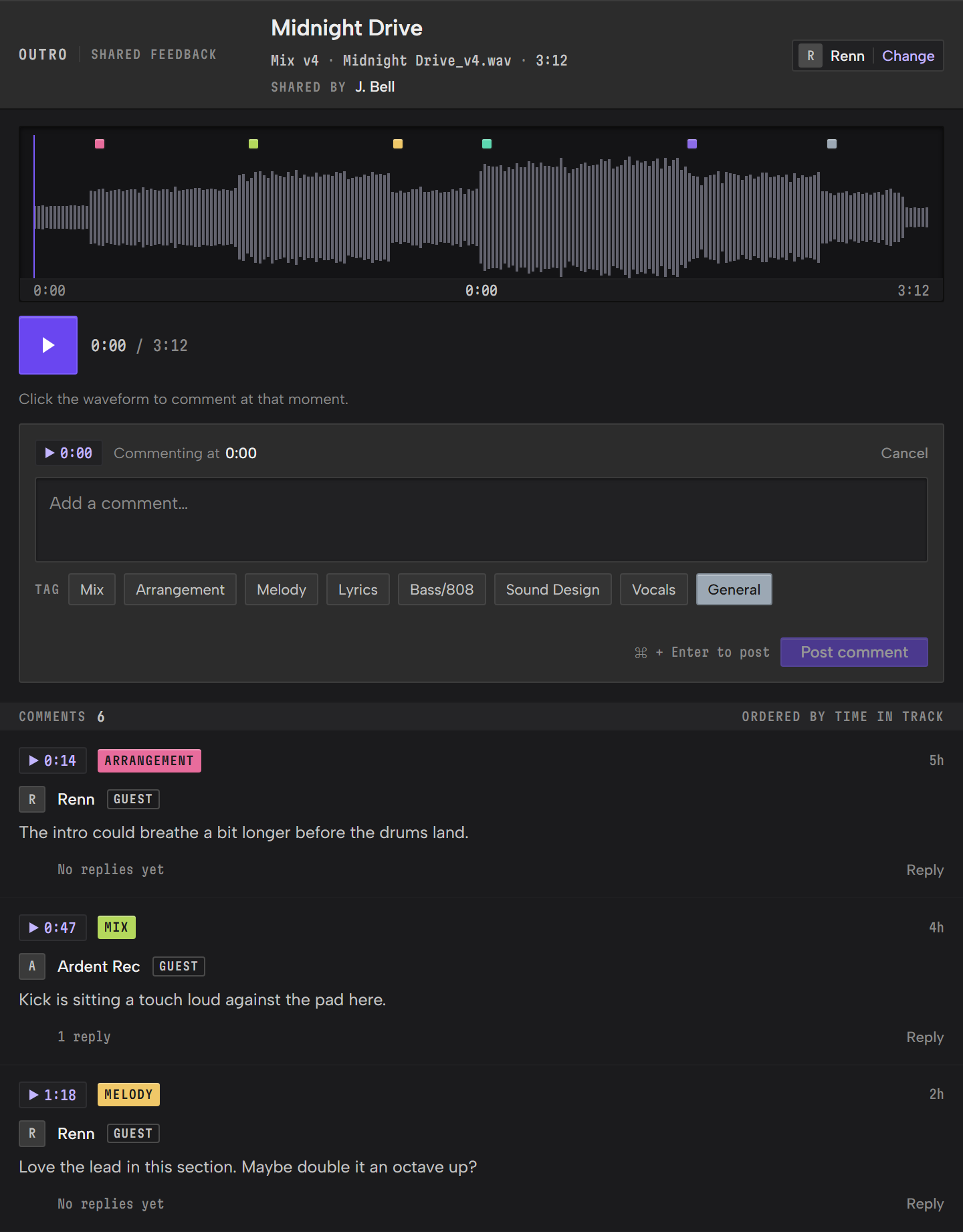
Notes written this way carry the part, the place and the change by default. Outro sits next to any DAW on Windows and Mac and is in beta. The Feedback Guide covers each step. For how Outro keeps the tasks, files, notes and feedback for each track in one place, see project management for music producers.